July 17, 2026
Friday Fabric Facts #11: Your Real Bottleneck Isn’t ETL Anymore – It’s “Where Do I Find the Good Stuff?”
The Executive Insight
For the last decade, the hard part of analytics was getting data in.
Pipelines, CDC, mirroring, shortcuts—Fabric has spent a lot of engineering effort on making ingestion cheap and boring. You can land Azure SQL, S3, on‑prem flat files, SaaS exports and more into OneLake with a fraction of the friction it used to take.
But when I talk to business leaders in organizations that have already piloted Fabric, the complaint has shifted:
“I know the data is somewhere in Fabric. I just don’t know which version to trust.”
The bottleneck is no longer “Do we have the data?” It’s:
“Can anyone outside the core team reliably find and use the right thing without calling us?”
This issue is about that shift—from pipelines to product discovery—and what OneLake Hub, the OneLake Catalog, and Purview are really trying to do for you.
The New Reality: OneLake Solved the Silo, Not the Search
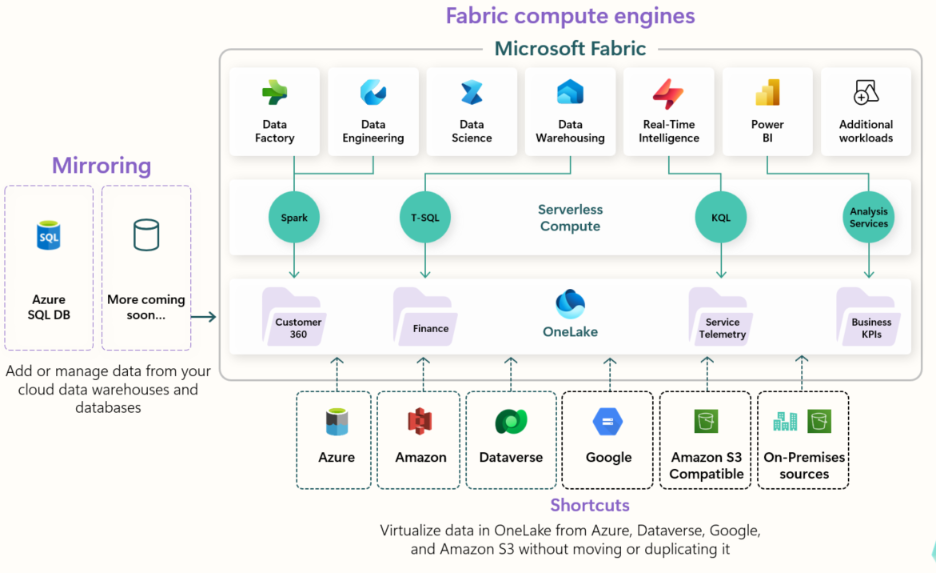
Microsoft’s OneLake vision is clear and compelling:
- One tenant → one logical data lake.
- No more separate storage accounts for each team.
- One copy of the data, reused across engines (warehouse, lakehouse, Power BI, real‑time, data science).
From an architecture standpoint, that’s a win. You cut down on:
- Data duplication.
- “Which storage account is this in again?” confusion.
- Integration sprawl across many little lakes.
But unifying storage doesn’t automatically unify understanding.
What business users experience, if you stop at “we have OneLake,” is this:
- A growing list of lakehouses, warehouses, datasets, and shortcuts.
- Workspace names that mean something to implementers, not decision‑makers.
- Multiple items that all look like they might contain “Sales,” “Inventory,” or “Customers.”
So yes, the data is “in one place” now. But from an end‑user’s perspective, it can still feel like a well‑organized swamp.
That’s the gap OneLake Data Hub and the OneLake Catalog are aiming at: making discovery first‑class.
What OneLake Hub and Catalog Actually Bring to the Table
If you read Microsoft’s docs and watch the Fabric conference keynotes on OneLake Catalog, a few themes jump out:
- OneLake Data Hub gives you:
- A filtered list of all data items you can access—lakehouses, warehouses, datasets, dataflows, etc.
- Filters by item type, workspace, and domain.
- Recommended / featured items and curated views for business users.
- The newer OneLake Catalog goes deeper:
- Search across tables, columns, measures, not just top‑level items.
- Surface metadata, ownership, sensitivity labels, and usage signals directly in the discovery UI.
- Integrates with Purview so catalog entries line up with governance: labels, DLP policies, and business glossary terms.
The story here isn’t “another list of things.” It’s:
“Can someone who doesn’t live in Fabric every day still find what they need—and know it’s safe to use—without a Teams thread and a favor?”
OneLake Hub and Catalog are Fabric’s first serious answers to that question.
A Pattern from the Field: The “Send Me the Link” Culture
Even in organizations with strong Fabric adoption, I keep seeing the same behavior:
- A manager needs a number or dataset.
- Instead of going to OneLake Hub or a catalog, they DM someone in the BI team:
- “Can you send me the link to the latest margin report?”
- “Do we have a dataset for XYZ already?”
- The BI person responds with a URL or a screenshot.
Multiply that by dozens of people, hundreds of needs, and months of time—and you quietly rebuild the same pattern you had before Fabric:
- Knowledge is local and social, not systematized.
- “The right thing” lives in bookmarks and chat history.
- New hires and external partners are always dependent on “the people who know.”
Meanwhile, the platform is shipping features precisely to break that cycle: a unified Hub, a searchable Catalog, tighter Purview integration, better metadata on lakehouses and warehouses.
The technology is there. The missing step is organizational:
“Do we treat discoverability as part of the product, or as an afterthought?”
The Strategic Shift: From “We Built It” to “You Can Find It”
I see a clear difference between teams that treat OneLake Hub and Catalog as checklists and those that treat them as interfaces.
Checklist mindset:
- “Yes, we turned on OneLake Data Hub; it shows our items.”
- “Yes, Purview can see Fabric; we ran a scan.”
Interface mindset:
- “For each domain, what should a sales director / plant manager / clinician see when they open the Hub?”
- “Which 10–20 data products deserve to be featured and fully documented?”
- “What signals (certification, ownership, usage) do we surface so a user can decide whether to trust this item without a meeting?”
OneLake Hub and Catalog give you the building blocks:
- Filter by domain → lines up with the domain thinking from Issue #9.
- Endorsement / certification → a visible hint of “this is the official one.”
- Columns, measures, and sensitivity → see if the structure and risk profile match what you need before you connect.
The product question becomes:
“When someone from Finance goes hunting for ‘Margin’, what do we want them to see first?”
If the answer is “a long, flat alphabetical list of everything,” you’ve just outsourced the last mile of product thinking to your users.
Where Purview Fits: Governance as a Discovery Feature
Microsoft’s Purview‑Fabric integration has evolved from “nice to have” to “this is actually important”:
- Fabric items now show up in Purview’s catalog search and lineage views, not just Power BI artefacts.
- Purview’s Unified Catalog and custom metadata let you attach business attributes to Fabric data products and then filter/search by those attributes.
- Sub‑item metadata (tables, columns, files) for lakehouses improves the “jump” from a business term to a concrete implementation.
This matters because:
- Business users rarely search by “table name.” They search by concept: “churn,” “on‑time delivery,” “ACV.”
- Data products are rarely just “tables.” They are contracts: purpose, owner, freshness, sensitivity, expected usage.
Purview + OneLake Catalog is Microsoft’s attempt to make those contracts visible and queryable, not just something you keep in Confluence or PowerPoint.
When you wire this up intentionally, governance stops being just about stops and starts. It becomes part of the “Where is the good stuff?” experience.
Hope for Lean Teams: You Don’t Need a Full Data Catalog Program
If you’re a lean SMB team, a full‑blown catalog and data literacy initiative can feel out of reach.
But you don’t need to boil the ocean to get value from OneLake Hub and Catalog.
I see small teams get a lot of mileage from three simple moves:
1️⃣ Curate a Short “Front Page” per Domain
- For each domain (Finance, Sales, Operations…), agree on 5–15 items that are the products you actually want people to use.
- Make sure they’re clearly named, owned, and certified/endorsed.
2️⃣ Tag and Label Those Products Properly
- Sensitivity labels, basic business metadata, clear descriptions.
- Enough context that a new stakeholder can tell, “This is for board‑level reporting” vs “This is raw.”
3️⃣ Teach People to Check the Hub First, Chat Second
- Culturally, replace “Send me the link?” with “Search in OneLake Hub under your domain; if you don’t find it, ping us.”
- None of that requires a new team. It requires a decision:
“Finding the right thing is part of the product, not a nice extra.”
You can iterate from there—deeper Purview integration, richer metadata, more domains—once that basic habit is in place.
Where I Fit In (For Partners and Leaders)
By now in this series, we’ve talked about architecture, semantics, governance, lifecycle, and domains. OneLake Hub and Catalog tie directly into all of them.
Because:
- Architecture decides what exists.
- Semantics decide what it means.
- Governance decides who can touch it.
- Lifecycle decides how it changes.
- Domains decide who owns it.
- Discovery (Hub/Catalog) decides whether anyone can actually benefit from it without calling the author.
I work with:
- Partners who want to walk into Fabric engagements not just with a build story, but with a “how your people will find and trust this” story.
- CIOs, CDOs, and CTOs in the mid‑market who feel like they finally have the data in one place—but are disappointed that stakeholders still hunt for links in chats.
- Business leaders in F&B, healthcare, and energy who don’t care what it’s called under the hood; they care if they can get to “their” truth in two clicks instead of two weeks.
My role is to help you:
- Decide which data products deserve “front page” treatment in OneLake.
- Align domains, catalog, and Purview so “good stuff” is obvious and “dangerous stuff” is controlled.
- Turn “send me the link” culture into “I know where to go for that.”
If you’ve already solved “Do we have the data?” and your next challenge is “Can anyone actually find and use it?”, then let's get together and talk.
Isaac Truong | Founder, Allston Yale
Enterprise-grade analytics for $50M–$100M SMBs
Power BI | Fabric | Azure | Data Strategy
📅 Book a 20-min Fabric diagnostic →
📧 Subscribe to get Friday Fabric Facts in your inbox (plus early access to templates) 💼
LinkedIn: Connect with me for daily Fabric tips
Friday Fabric Facts #11: Originally Posted on LinkedIn, April 10, 2026