Friday Fabric Facts #1: SQL Tools Just Got Smarter- Here's What It Means for Your Fabric Warehouse
Microsoft just announced major investments in SQL tooling for Fabric- but buried in the announcement is one capability that changes how SMB data teams should think about warehouse perforMicrosoft just announced major investments in SQL tooling for Fabric- but buried in the announcement is one capability that changes how SMB data teams should think about warehouse performance monitoring, security management, and migration planning.
If you're running SQL database in Fabric or thinking about migrating from Azure SQL or on-premises SQL Server, this 8-minute read will save you dozens of hours of troubleshooting next quarter and help you avoid the #1 mistake I see SMBs make when evaluating Fabric as their analytics platform.
What we'll cover:
- Microsoft's strategic bet on SQL-first tooling (and what it signals about Fabric's roadmap)
- The real business impact for $50M–$100M SMBs with lean IT teams
- Three concrete moves you can execute Monday morning (with step-by-step instructions)
- The architecture mistake that costs SMBs $15K–$40K in wasted capacity spend
📦 The Update: Microsoft's SQL Tools Investment (And Why It's a Big Deal)
What Microsoft Announced
The SQL tools and experiences team at Microsoft just committed to building "tools, SDKs, and experiences" focused on SQL Server, Azure SQL, and SQL database in Fabric.
This isn't just a feature announcement- it's a strategic signal. Microsoft is investing engineering resources to make Fabric's SQL layer feel native to the 10+ million SQL Server professionals worldwide who've spent decades mastering T-SQL, SSMS, and Azure Data Studio.
What's Actually New (The Technical Details)
1. Enhanced tooling for SQL database in Fabric
Fabric's SQL database (the warehouse layer that sits on top of OneLake) is getting first-class support in SQL Server Management Studio (SSMS) and Azure Data Studio.
What this means in practice:
- Full IntelliSense support for T-SQL queries against Fabric warehouses (autocomplete for table names, column names, functions)
- Visual query plan analysis so you can troubleshoot slow queries the same way you do in Azure SQL
- Object Explorer integration to browse tables, views, and schemas without switching to the Fabric portal
- Live query statistics to monitor in-flight queries (critical for identifying bottlenecks during peak hours)
Previously, many of these capabilities required switching between SSMS, Azure Data Studio, and the Fabric web portal- fragmenting the troubleshooting workflow.
2. Cross-product SDK improvements
Microsoft is unifying the developer experience across SQL Server, Azure SQL, and Fabric SQL database through shared SDKs (Software Development Kits).
For SMB data teams, this means:
- Reusable connection libraries: If your custom app connects to Azure SQL using SqlClient, it can connect to Fabric SQL database with minimal code changes
- Consistent authentication patterns: Azure AD (Entra ID) authentication works the same way across all three platforms
- Unified monitoring APIs: Tools like Datadog, Grafana, or custom monitoring scripts can query performance metrics using the same API calls
3. Better integration between SSMS, Azure Data Studio, and Fabric workspaces
You'll be able to:
- Launch Azure Data Studio directly from a Fabric workspace (one-click context switching)
- Save connection profiles in SSMS that point to Fabric SQL databases (no more copying connection strings)
- Use SSMS's "Generate Scripts" wizard to export schema definitions from Fabric warehouses
Why Microsoft Is Doing This Now
The strategic bet: Microsoft believes SQL professionals (DBAs, BI developers, data analysts) will become the primary users of Fabric warehouses- not just Spark engineers or data scientists.
The competitive context:
- Snowflake and Databricks are marketing themselves as "SQL-friendly" platforms for analytics engineers
- AWS Redshift has always been SQL-first
- Microsoft needs Fabric to feel equally native to the 70%+ of data teams who write T-SQL daily, not PySpark notebooks
By investing in SQL tooling, Microsoft is saying: "You don't need to become a data engineer to use Fabric. Your existing SQL skills are enough."
💡 Why This Matters (The Business Impact for Your SMB)
The Core Promise of Fabric (For Context)
If you're an SMB running Power BI on top of Azure SQL, SQL Server, or even Excel today, Microsoft pitches Fabric as your "cloud-native upgrade path."
What you get with Fabric:
- Unified analytics platform: Data lake (OneLake) + data warehouse (SQL database) + data pipelines + Power BI + real-time analytics- all in one subscription
- No infrastructure management: Microsoft handles scaling, backups, high availability, disaster recovery
- Integrated AI capabilities: Copilot for writing DAX/SQL, AI skills for predictions, semantic link for Python/R integration
- Pay-per-use pricing: Capacity-based billing (you pay for compute/storage you use, not per-database or per-user)
The pitch to CFOs: Replace 4–6 separate tools (Azure SQL, Azure Data Factory, Power BI Premium, Azure Synapse) with one platform and one bill.
The Concern Most CTOs Have
Here's the question I hear in every Fabric diagnostic call:
"Will my SQL team be able to troubleshoot performance, manage security, and write queries the same way they do in Azure SQL or will they need to learn a completely new toolset?"
Why this matters:
- Most $50M–$100M SMBs have 1–3 SQL-savvy people (a DBA, a BI developer, maybe a senior analyst)
- These teams are already stretched thin managing existing reports, ETL jobs, and ad hoc requests
- Retraining them on Spark notebooks, lakehouse architecture, and Python/Scala is a 6–12 month investment most SMBs can't afford
- If the tooling is unfamiliar, adoption stalls and Fabric becomes "shelfware"
This tooling investment answers that concern. Microsoft is making Fabric's SQL layer feel like Azure SQL (familiar tooling, familiar workflows), not like a black-box lakehouse you can only query through notebooks.
Real-World Scenario: Healthcare Company Migration
Let me walk you through a real example (anonymized client details).
Company profile:
- $60M revenue, multi-location healthcare services provider
- IT team: 1 CTO, 2 SQL developers, 1 BI analyst
- Current stack: SQL Server 2019 on-premises + 40+ SSRS reports + Power BI Pro licenses
- Pain point: SSRS reports take 10–15 minutes to refresh; manual Excel exports for board meetings; no real-time dashboards
The migration goal: Move to Fabric to get real-time dashboards, reduce report refresh times, and eliminate manual Excel work- without retraining the SQL team on PySpark.
What the SQL tooling investment enables:
1. No forced rewrite of T-SQL logic
The team had 200+ stored procedures handling business logic (patient visit aggregations, provider productivity calculations, billing reconciliation).
With enhanced SSMS support for Fabric SQL database:
- They can copy/paste stored procedures from SQL Server to Fabric (with minor syntax adjustments for unsupported features)
- They can test procedures in SSMS using the same debugging workflow (step through code, inspect variables)
- They can schedule execution via Fabric pipelines (not SQL Agent, but visually similar)
Result: 85% of stored procedures migrated in 3 weeks (vs. 4–6 months if they had to rewrite everything in Spark)
2. Familiar troubleshooting workflow
When a Power BI report runs slow, the BI analyst can:
- Open SSMS
- Connect to the Fabric SQL database
- Run the same query Power BI is running
- View the execution plan to identify missing indexes or scan-heavy operations
- Fix the issue using standard T-SQL tuning techniques (add indexes, rewrite joins, partition tables)
Result: The team didn't need to learn Databricks notebooks, Spark UI, or lakehouse optimization—they used the same SSMS skills they've had for 10 years.
3. Security management stays SQL-based
The CTO needed to enforce row-level security (only show doctors their own patients, only show clinic managers their own clinic's data).
With SSMS integration:
- They can define row-level security policies in T-SQL (same syntax as Azure SQL)
- They can test policies in SSMS by impersonating users (EXECUTE AS USER =
This email address is being protected from spambots. You need JavaScript enabled to view it. ') - They can audit permissions using standard SQL queries against system views
Result: Security implementation took 2 days instead of 2 weeks (no need to learn Fabric's workspace roles + OneLake security + Power BI RLS separately)
Why This Matters for Food & Beverage and Energy SMBs
The same pattern applies to Isaac's other verticals:
Food & beverage ($50M–$100M):
- Typical stack: SQL Server + Excel-based demand planning + manual inventory reports
- SQL team strength: 1–2 people who know T-SQL and SSRS
- Fabric value: Real-time inventory dashboards, automated demand forecasting, trade spend analytics- without retraining the SQL team on data engineering tools
Energy SMBs:
- Typical stack: Historian databases (OSIsoft PI, Aveva) + SQL Server for reporting + Excel for field operations
- SQL team strength: 1 BI developer + 1 DBA managing SQL Server
- Fabric value: Integrate real-time sensor data (via Event Streams) with SQL-based reporting- using T-SQL for transformations instead of Spark
✅ The Move (What You Can Do Monday Morning)
Here are three concrete actions you can take this week to evaluate whether Fabric's SQL tooling fits your SMB's needs. Each takes 30–60 minutes.
Move #1: Test SSMS Connectivity to Fabric SQL Database (Free Tier Available)
Why do this: Prove to yourself (and your team) that SSMS works with Fabric the same way it works with Azure SQL. This removes the "unknown tooling" risk from your evaluation.
Step-by-step instructions:
1. Create a trial Fabric workspace (10 minutes)
- Go tohttps://app.fabric.microsoft.com
- Sign in with your work account (or create a free Microsoft account)
- Click "Workspaces" → "New workspace" → Name it "Fabric SQL Test"
- Select "Trial" capacity (gives you 60 days of free Fabric capacity—no credit card required)
2. Provision a SQL database in Fabric (5 minutes)
- Inside your workspace, click "New" → "Warehouse"
- Name it "TestWarehouse"
- Wait 2–3 minutes for provisioning
- Once created, click "Settings" → "SQL connection string" → Copy the connection string
3. Connect via SSMS (5 minutes)
- Open SQL Server Management Studio (download latest version:https://aka.ms/ssmsfullsetup)
- Click "Connect" → "Database Engine"
- Paste the Fabric SQL connection string in the "Server name" field
- Authentication: Select "Azure Active Directory - Universal with MFA"
- Enter your work email
- Click "Connect"
4. Run a test query (5 minutes)
- Right-click your warehouse → "New Query"
- Run:
- Observe query execution time (should be <1 second for this toy example)
- Right-click the query → "Display Estimated Execution Plan" (verify this works)
What to look for:
- ✅ Does IntelliSense autocomplete table/column names?
- ✅ Can you browse tables in Object Explorer?
- ✅ Can you view execution plans?
- ✅ Does the workflow feel like Azure SQL?
If yes to all four, your SQL team can work in Fabric using familiar tools.
Move #2: Audit Your Current SQL Dependencies (Identify Migration Blockers)
Why do this: Not all SQL Server features are supported in Fabric SQL database. Knowing your blockers before migration prevents expensive surprises.
Step-by-step instructions:
1. List stored procedures, views, and scripts your team runs daily (15 minutes)
Run this query in your current SQL Server or Azure SQL database:
sql
-- Find all stored procedures SELECT SCHEMA_NAME(schema_id) AS SchemaName, name AS ObjectName, type_desc AS ObjectType, create_date, modify_date FROM sys.objects WHERE type IN ('P', 'V', 'FN', 'TF') -- Procedures, Views, Functions ORDER BY modify_date DESC;
Export the results to Excel. You now have an inventory.
2. Flag anything using SQL Server-specific features (20 minutes)
Search your stored procedure code for these keywords (common migration blockers as of Jan 2026)
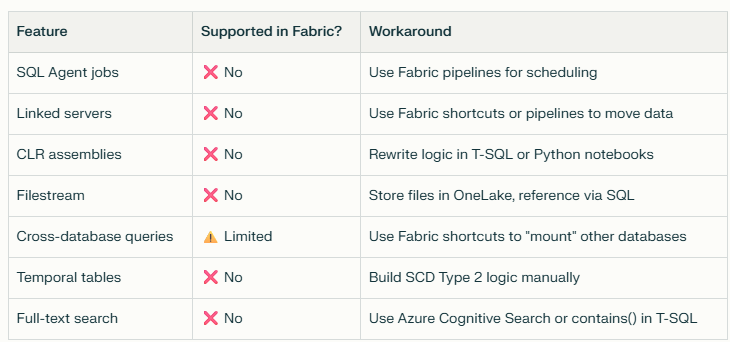
How to search your code:
-- Find procedures using SQL Agent (xp_* procedures)
SELECT OBJECT_NAME(object_id), OBJECT_DEFINITION(object_id)
FROM sys.sql_modules
WHERE OBJECT_DEFINITION(object_id) LIKE '%xp_%'
OR OBJECT_DEFINITION(object_id) LIKE '%sp_send_dbmail%';
-- Find procedures using linked servers
SELECT OBJECT_NAME(object_id), OBJECT_DEFINITION(object_id)
FROM sys.sql_modules
WHERE OBJECT_DEFINITION(object_id) LIKE '%OPENQUERY%'
OR OBJECT_DEFINITION(object_id) LIKE '%linked_server%';
Export the results. These are your migration blockers.
3. Estimate rewrite effort (10 minutes)
For each blocker, estimate:
- Low effort (1–2 hours): Replace SQL Agent job with Fabric pipeline
- Medium effort (1–2 days): Rewrite cross-database query as pipeline + SQL
- High effort (1–2 weeks): Rewrite CLR assembly logic in Python
Add up the hours. This is your migration tax.
Example from a real client:
- 40 stored procedures scanned
- 3 used SQL Agent (low effort: 6 hours to convert to pipelines)
- 1 used linked servers (medium effort: 2 days to rewrite as data flow)
- 0 used CLR (high effort: dodged a bullet)
- Total migration tax: 2.5 days (vs. 4–6 weeks if they'd discovered this during migration)
Move #3: Ask Microsoft (or Your Partner) One Question
Why do this: Microsoft is actively investing in Fabric SQL tooling, which means the feature gap list changes every quarter. Knowing what's not supported today prevents scope creep.
The question to ask:
"Which SSMS features are NOT supported in Fabric SQL database as of January 2026, and what's on the roadmap for the next 6 months?"
Where to ask:
- Microsoft sales rep (if you have one)
- Microsoft partner (like Allston Yale)
- Fabric community forum:https://community.fabric.microsoft.com
- Microsoft Support (open a free pre-sales ticket)
Example gaps as of Jan 2026:
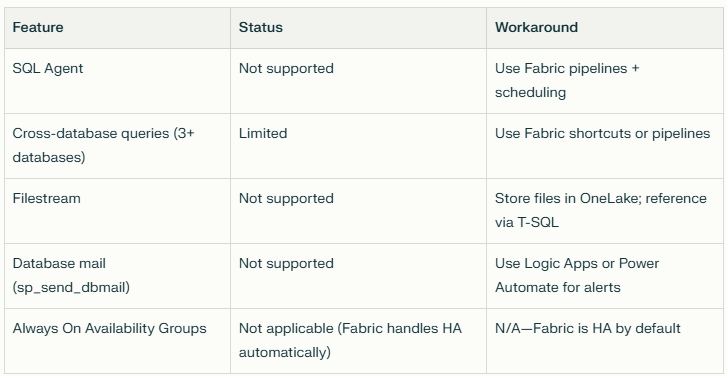
Why this matters: This list changes fast as Microsoft invests. In Q4 2025, cross-database queries were completely unsupported. As of Jan 2026, they're "limited" (2-way joins work; 3-way joins don't). By Q2 2026, they might be fully supported.
Knowing the current state prevents you from designing around a limitation that won't exist in 6 months.
⚠️ The Gotcha (Common Mistake That Costs SMBs $15K–$40K)
The Mistake: "SQL database in Fabric" ≠ "Azure SQL in Fabric"
Here's the architecture misunderstanding I see most often:
What SMBs assume: "Fabric SQL database is just Azure SQL, but with OneLake integration and Power BI bundled in. I can replace my Azure SQL database with Fabric SQL database and get the same performance for transactional workloads—plus analytics on top."
What's actually true: Fabric SQL database is built on a different engine optimized for analytics (columnar storage, lakehouse integration), not transactional OLTP workloads.
Technical Deep-Dive: Why the Engine Matters
Azure SQL architecture:
- Row-store engine: Data stored row-by-row (optimized for INSERT/UPDATE/DELETE operations)
- Write-optimized: Handles thousands of concurrent writes per second
- OLTP use case: Order entry systems, ERP databases, CRM systems
Fabric SQL database architecture:
- Columnar storage: Data stored column-by-column (optimized for SELECT queries with aggregations)
- Read-optimized: Handles complex analytical queries across billions of rows
- OLAP use case: Data warehouses, reporting databases, Power BI DirectQuery sources
Translation for Non-Technical Leaders
✅ Fabric SQL database is great for:
- Reporting queries (dashboards, Power BI, SSRS)
- Aggregate calculations (SUM, AVG, COUNT across millions of rows)
- Power BI DirectQuery (real-time dashboards without importing data)
- Historical analysis (year-over-year trends, cohort analysis)
❌ Fabric SQL database is NOT ideal for:
- High-frequency writes (order entry, IoT sensor data, clickstream logs)
- Row-by-row updates (updating inventory counts 1,000x/minute)
- Real-time transaction processing (OLTP workloads)
- Applications that need sub-10ms write latency
Real Mistake I've Seen (And How Much It Cost)
Company profile:
- $75M food distributor
- Current stack: Azure SQL (operational database for order entry) + SQL Server (reporting database, refreshed nightly)
- Pain point: Paying for two SQL databases ($800/month for Azure SQL + $400/month for SQL Server VM)
The decision: CTO saw Fabric's pricing ($0.18/hour for capacity) and thought: "If I move both databases to Fabric SQL, I'll pay $130/month instead of $1,200/month. That's $12K/year in savings."
What happened:
- Week 1: Migrated reporting database to Fabric SQL → ✅ Success (queries ran 2x faster)
- Week 2: Migrated operational database to Fabric SQL → ❌ Disaster
- Week 3: During peak order entry hours (lunch rush, 11 AM–1 PM), write operations slowed to 5–10 seconds per INSERT
- Customer service reps saw "saving order..." spinners for 10+ seconds
- Orders backed up; phones rang off the hook
- CTO rolled back to Azure SQL after 3 weeks
The cost:
- 3 weeks of engineering time (80 hours @ $150/hour loaded cost = $12K)
- Lost productivity (customer service reps idle during peak hours)
- Reputational damage (customers complained about slow order system)
Total waste: $15K–$20K (more than the annual savings they were chasing)
The Right Architecture (Hybrid Approach)
What the company should have done:
Keep transactional workloads in Azure SQL:
- Order entry system stays in Azure SQL (optimized for writes)
- Customer service reps experience no slowdown
- Cost: $800/month (unchanged)
Use Fabric SQL database as the analytics layer:
- Load data from Azure SQL into Fabric SQL database via Fabric pipelines (ETL) or database mirroring (near-real-time replication)
- Run all Power BI reports and dashboards against Fabric SQL database (read-optimized)
- Cost: $130–$200/month for Fabric capacity (depending on query volume)
Total cost: $930–$1,000/month (still 17% savings vs. $1,200/month, with zero performance risk)
How to Know Which Workload Goes Where
Use this decision tree:
Question 1: Is this workload write-heavy or read-heavy?
- Write-heavy (>100 INSERTs/UPDATEs per second) → Azure SQL or SQL Server
- Read-heavy (mostly SELECT queries) → Fabric SQL database
Question 2: Do users need sub-second response times for writes?
- Yes (e.g., order entry, POS systems) → Azure SQL
- No (e.g., nightly batch loads, hourly ETL) → Fabric SQL database
Question 3: Is this data used for operational decisions or analytical decisions?
- Operational (e.g., "Is this item in stock?") → Azure SQL
- Analytical (e.g., "Which products had the highest return rate last quarter?") → Fabric SQL database
The Migration Pattern That Works
Step 1: Keep your operational database where it is (Azure SQL or SQL Server)
Step 2: Set up Fabric database mirroring (new feature as of Q4 2025)
- Mirroring replicates data from Azure SQL to Fabric in near-real-time (5–15 minute lag)
- No ETL code to write; Microsoft handles it automatically
- Source database experiences minimal performance impact
Step 3: Point Power BI reports at Fabric SQL database
- Reports query the mirrored data in Fabric (read-optimized)
- Operational database is freed up for transactional workloads
- Users see near-real-time data (5–15 minute freshness is fine for most dashboards)
Step 4: Decommission your old reporting database (if you had a separate one)
- Fabric SQL database replaces your reporting database
- You no longer pay for a second SQL Server VM or Azure SQL instance
- This is where the cost savings come from (not from replacing operational databases)
🎓 Resource Library (Free Downloads for Subscribers)
This Week's Bonus: "The 5-Question Fabric Readiness Checklist"
Answer these 5 questions to know if your SMB is ready to migrate to Fabric (or if you need to solve foundational issues first):
1. Do you have a single source of truth for key metrics (revenue, margin, inventory)?
- ✅ Yes → Proceed to Q2
- ❌ No → Fix data governance first (Fabric won't magically align mismatched definitions)
2. Is your current SQL Server or Azure SQL database performance-bottlenecked?
- ✅ Yes (slow reports, maxed-out DTUs) → Fabric will help
- ❌ No (performance is fine) → Migration ROI is lower; focus on new analytics use cases instead
3. Do you have more than 3 separate tools in your analytics stack (ERP + reporting DB + Power BI + ETL tool + Excel)?
- ✅ Yes → Fabric consolidation will save costs and simplify management
- ❌ No (1–2 tools) → Consolidation ROI is lower
4. Does your team know T-SQL but NOT Python/Spark?
- ✅ Yes → Fabric's SQL tooling investment makes you a great fit
- ❌ No (team is already Spark-native) → Databricks might be a better fit
5. Are you spending >$1,500/month on Azure SQL + Power BI + ETL tools?
- ✅ Yes → Fabric capacity pricing will likely save money
- ❌ No (<$1,500/month) → Cost savings are marginal; migrate for features, not cost
Your score:
- 4–5 "Yes" answers: High Fabric readiness—schedule a diagnostic call
- 2–3 "Yes" answers: Medium readiness—pilot one use case first
- 0–1 "Yes" answers: Low readiness—solve foundational data issues before migrating
💬 One Question for You
What's your #1 hesitation about moving from Azure SQL (or SQL Server) to Fabric?
Drop it in the comments or DM me:
A) "Performance under heavy query load"
B) "Migration cost and downtime"
C) "Team retraining on new tools"
D) "Vendor lock-in with Microsoft"
E) Something else (tell me)
Isaac Truong | Founder, Allston Yale
Enterprise-grade analytics for $50M–$100M SMBs
Power BI | Fabric | Azure | Data Strategy
📅 Book a 20-min Fabric diagnostic →
📧 Subscribe to get Friday Fabric Facts in your inbox (plus early access to templates) 💼
LinkedIn: Connect with me for daily Fabric tips
Friday Fabric Facts #1: Originally Posted on LinkedIn, January 31, 2026